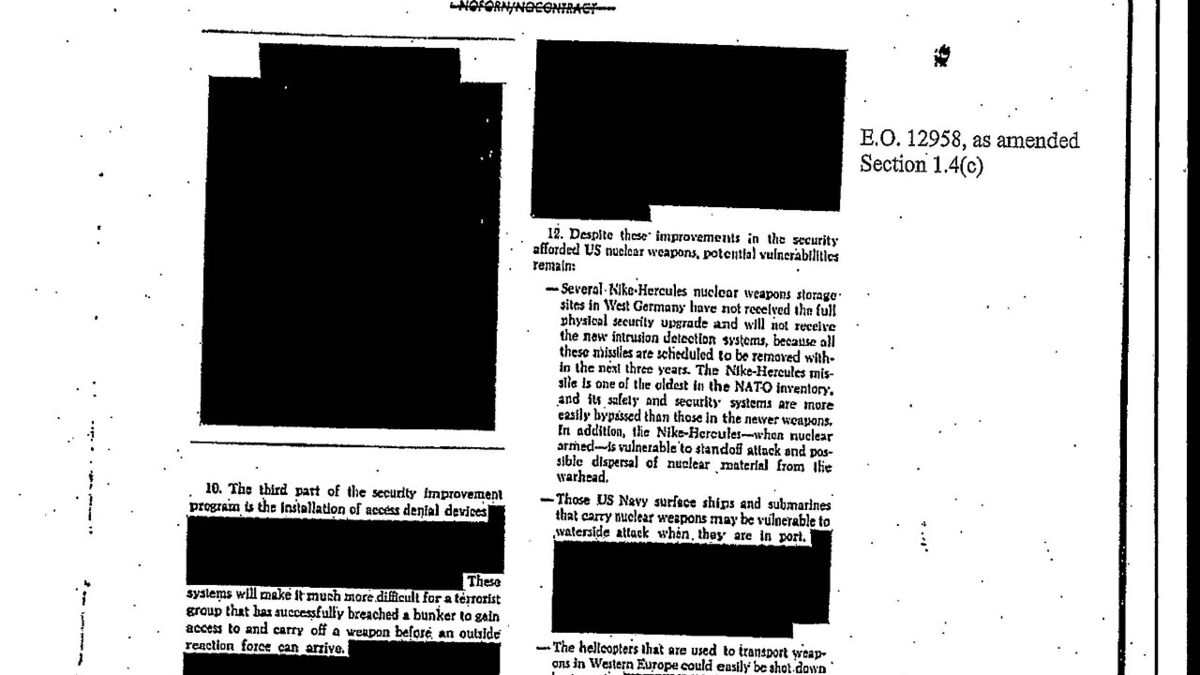
Before text goes into an AI assistant, an API call or a shared log, remove the personal data the task does not need. Start with identifiers that have a recognisable shape, such as email addresses, phone numbers, IP addresses and card-like numbers, and use pattern matching to catch them. Then read the text for names, addresses and details that identify a customer, because patterns cannot see those. Finally, check the result against the original. Covering text with a black box is not the same as removing it, and a pattern tool is a first pass, not a guarantee.
This guide uses the site's Instant Document Cleaner & Redactor and Named Entity Highlighter. Both normally run in your browser. The redactor page notes a server fallback, which the section on patterns explains.
Going deeper on this theme: How to Remain Valuable When Intelligence Becomes Cheap — the scarce human, economic, and strategic advantages that stay valuable when AI does the cognitive work. A 224-page practical book, $3.84. Read it on Gumroad →
Decide what the model needs
Most AI tasks do not need the identity behind a document. They need the question, the facts that bear on it and enough context to answer. Settle that first, and the redaction job gets much smaller.
When an identifier is needed to keep a conversation coherent, replace it with a stable placeholder rather than deleting it. "Customer A asked for a refund, and Customer A's order shipped late" reads better than two gaps, and the model can still follow who did what. Keep the table that maps placeholders to real names on your own machine, never in the prompt.
What counts as personal data
The EU's GDPR defines personal data as any information relating to an identified or identifiable natural person. Wikipedia's article on personal data also notes that an IP address may be classed as personal data. Three groups matter in practice:
- Direct identifiers: full names, email addresses, phone numbers, postal addresses, customer or account IDs, and IP addresses.
- Combinations: a job title, a city and a date can identify one person even though none of them does alone. The article calls these quasi- or pseudo-identifiers.
- Secrets: API keys, passwords and access tokens are not personal data, but an exposed key can cause serious harm too.
The law varies by place and context, so this guide is about reducing exposure, not about compliance. Check your own obligations separately.
What the pattern tools catch
The Instant Document Cleaner & Redactor replaces matches with labels such as [EMAIL-REDACTED]. Its options, with their defaults, are:
| Option | Default | What it matches |
|---|---|---|
| Email addresses | On | Text with a name, an @ sign and a domain |
| Phone numbers | On | Ten-digit North American style numbers, with or without separators and an optional +1 |
| URLs | Off | Text that starts with http:// or https:// |
| IP addresses | On | Dotted IPv4 addresses with four parts from 0 to 255 |
| SSN-style numbers | On | Nine digits in a 3-2-4 pattern, with optional separators |
| Card-style numbers | On | Sixteen digits in groups of four, with optional separators |
| Custom pattern | Empty | Any regular expression you enter, matched case-insensitively |
Two things in that table need care. The SSN and card patterns are loose: any nine digits in that shape, or any sixteen digits in groups, will match, including order numbers and reference codes. Expect some false positives and check them. Second, whitespace normalisation is on by default. It converts line endings, collapses runs of spaces and tabs into one space, and reduces runs of blank lines to a single blank line. That tidies pasted text, but it also flattens indentation, so do not run code through it. Expect a diff against the original to show changes beyond the redactions.
Here is what the redactor produced for a short sample with made-up details. The first block is the input and the second is the output of the site's own script, run on exactly this text:
Hi, I'm Dana Reyes. Reach me at dana.reyes@example.com or 212-555-0147.
The server 10.0.4.17 returned card 4111 1111 1111 1111 for order 88412.
Hi, I'm Dana Reyes. Reach me at [EMAIL-REDACTED] or [PHONE-REDACTED].
The server [IP-REDACTED] returned card [CARD-REDACTED] for order 88412.The sample shows the pattern tool's strength and its limit in one example. It is quick and reliable for shapes it knows. It is blind to everything else.
What patterns cannot see
A name, a street address or a free-text account note has no fixed shape, so no pattern will reliably find it. The Named Entity Highlighter marks emails, URLs, dates, phone numbers and IP addresses. That is a fast way to see what the pattern families can find before you redact. It does not mark names. For those, read the text, search for each name you know is present, and replace each one with the same placeholder everywhere it appears.
Read the output the way a stranger would. Ask what someone could work out from the remaining details, not only whether a field is present. A job title and a city together can be enough.
Covering is not removing
The most common redaction failure is visual. In PDF and word processor files, a black rectangle drawn over text usually leaves the text in the file. Wikipedia's article on redaction describes the problem directly: where text is covered by graphical elements, usually black rectangles, the original text remains in the file and can be uncovered by deleting the overlay. In 2005, a US military report about the death of an Italian secret agent was published as a PDF in which the blacked-out parts could be recovered by copying and pasting them into a word processor.
Pasted text has no black bars, but the same discipline applies. Delete the text, and check the output rather than the picture of it. For a PDF, copy the text out of the final file and search for each removed value. Word files add a second layer: the same Wikipedia article notes that word processing formats can save a revision history that still contains the redacted text. Photos carry their own metadata, which the EXIF guide covers. The Image EXIF Viewer + Remover inspects and strips that metadata in your browser.
Look for secrets separately
API keys, passwords and access tokens are high-value, and many look random. The Entropy & Randomness Analyser calculates Shannon entropy per byte and flags high-entropy blobs, which helps you find a key pasted into a config file. It is a server form, though, so do not paste a live secret into it. Test with a placeholder that has the same shape, such as a fake key with the right length and character set.
If a live key has already been pasted into a chat, a document or a shared tool, treat it as exposed and rotate it. Deleting it from the text afterwards does not undo the exposure.
A repeatable workflow
- Define the need. Write down what the AI task requires. Everything else stays out.
- Scan. Run the text through the Named Entity Highlighter to see the emails, URLs, dates, phone numbers and IP addresses.
- Pattern-redact. Run the Instant Document Cleaner & Redactor. Add a custom pattern for your own identifiers, such as internal customer or order IDs.
- Review by hand. Read for names, addresses and free-text details, and replace each with a consistent placeholder.
- Diff. Compare the original and the cleaned text in the Text Diff Viewer, and confirm that only the intended parts changed.
- Check the file. For PDFs and documents, copy the text out of the final file and search for every removed value.
Running the same steps every time is what makes the process dependable. A careful pass you remember to do is much less reliable than a short checklist you run for every document.
Frequently asked questions
Is pattern-based redaction enough?
No. Patterns catch structured data such as emails, phone numbers, IP addresses and card-like numbers. Names, addresses and free-text details have no fixed shape, so they need a human read.
Does the Instant Document Cleaner & Redactor upload my text?
The page says the form normally uses the browser engine, and that a server fallback is available only if the local implementation is unavailable. Look for that notice before you use the tool on sensitive text.
Should I replace names with placeholders or delete them?
Replace them with consistent placeholders, such as Customer A. Deleting leaves gaps that make sentences hard to follow, and it can push the model to guess at the missing context.
Can a redacted PDF still leak text?
Yes, if the black boxes were drawn over the text rather than removing it. Copy the text out of the final file and search for each removed value. The Wikipedia article on redaction describes the same failure.
Does removing personal data make something safe to share?
Not on its own. It reduces exposure, but it does not settle legal or contractual obligations. This guide covers the technical steps only and is not legal advice.
What should I do about API keys and passwords?
Treat any live key that has been pasted anywhere as exposed, and rotate it. Test secret-detection tools with placeholder values, because the Entropy & Randomness Analyser is a server form.